

Introduction
Your website is live. You’ve invested thousands of dollars. The design looks professional. You’re excited.
But here’s the problem: No one is finding it. And the few who do aren’t converting into customers.
You’re not alone. A shocking 88% of online consumers won’t return to a website after a bad user experience. And if your site doesn’t appear on Google’s first page, you’re practically invisible, 75% of users never scroll past the first page of search results.
Here’s the harsh reality: In 2026, having a website isn’t enough. You need a website that:
- Ranks on Google (and other search engines)
- Loads in under 3 seconds (or users bounce)
- Converts visitors into customers (or you’re just wasting traffic)
- Works flawlessly on mobile (where 60%+ of searches happen)
- Builds trust instantly (or competitors win)
This isn’t just about looking good online. It’s about generating revenue.
According to Google, 53% of mobile users abandon sites that take longer than 3 seconds to load. That’s literally half your potential customers gone before they even see your product.
But here’s the good news: The businesses winning online in 2026 aren’t spending more, they’re building smarter.
In this comprehensive guide, we’ll reveal:
- Why 91% of businesses fail at web development (and how to avoid their mistakes)
- The 2026 SEO strategies that actually work (AI Overviews, GEO, Entity SEO)
- How to turn your website into a 24/7 sales machine
- Real examples of businesses that 10X’d their leads with proper web dev + SEO
- A complete checklist to audit your current website
Let’s diagnose what’s broken and fix it, permanently.
Part 1: The Brutal Truth About Your Website
The 3-Second Test: Are You Losing 50% of Visitors Immediately?

When someone lands on your website, you have 3 seconds to convince them to stay.
That’s it. Three seconds.
Here’s what happens in those critical moments:
0-1 Second:
- Page starts loading
- User decides if they’ll wait
- 40% bounce if it takes longer than 3 seconds
1-2 Seconds:
- First visual impression forms
- Trust assessment begins (professional design vs. amateur)
- Mobile responsiveness evaluated
2-3 Seconds:
- User scans for relevance (does this solve my problem?)
- Navigation clarity assessed (can I find what I need?)
- Decision to stay or leave is made
After 3 Seconds:
- If page isn’t fully loaded and relevant → User hits back button
- If page loads but looks unprofessional → User doubts your credibility
- If page loads but navigation is confusing → User leaves frustrated
The Statistics Are Brutal:
- 53% of mobile users leave if a site takes over 3 seconds to load (Google)
- 88% of consumers won’t return after a bad experience (Gomez)
- 94% of first impressions are design-related (ResearchGate)
- 75% of users judge a company’s credibility based on website design (Stanford)
Translation: If your website fails the 3-second test, you’re losing thousands of dollars in potential revenue every single month.
Part 2: The 7 Deadly Sins of Business Websites (Are You Guilty?)
After analyzing hundreds of business websites, we’ve identified the 7 critical mistakes that kill conversions and rankings:
Sin #1: Slow Loading Speed
The Problem:
Your beautiful website takes 8 seconds to load. By second 4, half your visitors are gone.
The Data:
- Amazon loses $1.6 billion annually for every second delay
- Pages loading in 2 seconds have 9% bounce rate
- Pages loading in 5 seconds have 38% bounce rate
- Mobile users are 5x more likely to abandon slow sites
What’s Causing It:
- Uncompressed images (3MB photos when 300KB would work)
- No browser caching enabled
- Too many plugins or scripts
- Cheap hosting providers
- No Content Delivery Network (CDN)
The Fix:
- Compress all images (use WebP format)
- Enable browser caching
- Minify CSS, JavaScript, and HTML
- Upgrade to quality hosting with SSD storage
- Implement a CDN (Cloudflare, AWS CloudFront)
- Lazy load images below the fold
ROI Impact: A 1-second improvement in load time can increase conversions by 7%. For a business making $100K/year online, that’s $7,000 in additional revenue from a one-time fix.
Sin #2: Not Mobile-Optimized
The Problem:
Your site looks perfect on desktop. On mobile, it’s a disaster, text is tiny, buttons don’t work, navigation is broken.
The Data:
- 60% of all Google searches happen on mobile devices
- Google uses mobile-first indexing (your mobile site determines your rankings)
- 57% of users won’t recommend a business with a poorly designed mobile site
- Mobile commerce is projected to account for 72.9% of all e-commerce by 2026
What’s Causing It:
- Old website built before mobile-first design
- Fixed-width layouts that don’t respond
- Buttons too small to tap on mobile
- Pop-ups that can’t be closed on mobile
- Forms that are impossible to fill out on phones
The Fix:
- Implement responsive design that adapts to all screen sizes
- Use larger, touch-friendly buttons (minimum 48×48 pixels)
- Simplify navigation for mobile users
- Test on actual mobile devices, not just browser resize
- Ensure forms auto-format and have large input fields
ROI Impact: After mobile optimization, businesses typically see 30-50% increase in mobile conversions. If you’re getting 1,000 mobile visitors/month with 2% conversion, that’s 6-10 additional customers monthly.
Sin #3: Invisible on Google (Zero SEO Strategy)
The Problem:
Your website exists, but Google doesn’t know about it. Or if it does, you’re on page 5 (where no one goes).
The Data:
- 75% of users never scroll past page 1 of search results
- The #1 result gets 39.8% of all clicks (Backlinko)
- 70% of marketers say SEO is better than PPC for generating sales
- 68% of online experiences begin with a search engine
What’s Causing It:
- No keyword research done before building site
- Pages have no meta titles or descriptions
- Content is too thin (under 500 words)
- No internal linking structure
- Zero backlinks from other sites
- Technical SEO issues (broken links, duplicate content, no XML sitemap)
The Fix:
- Comprehensive keyword research for your industry
- Optimize every page with proper meta titles and descriptions
- Create substantial content (1,500+ words for important pages)
- Build logical internal linking structure
- Start earning quality backlinks (guest posts, partnerships, PR)
- Fix all technical SEO issues
- Submit XML sitemap to Google Search Console
ROI Impact: Organic search delivers 1000%+ ROI compared to paid ads. A business spending $2,000/month on Google Ads could potentially replace that with SEO investment and get compounding results over time.
Sin #4: No Clear Call-to-Action (Confusing Navigation)
The Problem:
Visitors land on your site and think “Now what?” There’s no clear next step. They wander aimlessly and leave.
The Data:
- 70% of small business websites lack a clear CTA
- Websites with a single, clear CTA increase conversions by 371% vs. multiple competing CTAs
- Users take an average of 2.6 seconds to focus on a CTA
What’s Causing It:
- Too many options overwhelming visitors
- CTA buttons blend into design (poor contrast)
- Vague button text (“Click Here” vs. “Get Your Free Quote”)
- CTA buried at bottom of page
- Different CTAs on every page (no consistency)
The Fix:
- Single primary CTA per page (book consultation, get quote, start free trial)
- High-contrast CTA buttons (stand out visually)
- Action-oriented text (“Schedule My Free Consultation”)
- Place CTA above the fold and repeat strategically
- Use directional cues (arrows pointing to CTA)
- A/B test different CTA placements and wording
ROI Impact: Optimizing CTAs alone can increase conversion rates by 200-300%. For a business with 1,000 monthly visitors at 2% conversion (20 leads), that becomes 40-60 leads, doubling or tripling customer acquisition.
Sin #5: Amateur Design That Screams “Don’t Trust Me”
The Problem:
Your website looks like it was built in 2010. Or worse, it looks like a template that 10,000 other businesses are using.
The Data:
- 75% of consumers judge a company’s credibility based on website design
- 38% of people will stop engaging if layout is unattractive
- First impressions are 94% design-related
- It takes 0.05 seconds for users to form an opinion about your site
What’s Causing It:
- Using cheap WordPress themes with no customization
- Stock photos that look fake (generic business handshakes)
- Inconsistent branding (different fonts, colors everywhere)
- Cluttered layout with too much text
- Outdated design trends (flash animations, auto-play music)
The Fix:
- Custom design that reflects your brand identity
- Professional photography or high-quality custom graphics
- Consistent typography (2-3 fonts maximum)
- White space for breathing room (don’t crowd everything)
- Modern design trends: minimalism, bold typography, micro-interactions
- Brand-consistent color palette throughout
ROI Impact: Professional design increases perceived value. The same service priced at $99 with amateur design vs. $199 with professional design will see better conversion at the higher price, because design communicates quality.
Sin #6: Zero Content Strategy (Thin, Generic Pages)
The Problem:
Every page has 2-3 paragraphs of generic fluff. No depth. No value. Nothing that makes Google want to rank you.
The Data:
- Average first-page result on Google contains 1,447 words (Backlinko)
- Long-form content gets 77% more backlinks than short articles
- Content marketing costs 62% less than traditional marketing and generates 3x more leads
- 72% of marketers say content creation is their most effective SEO tactic
What’s Causing It:
- Viewing website as a “digital brochure” instead of a marketing tool
- No content calendar or strategy
- Writing for yourself, not your customers
- No blog or resources section
- Pages created once and never updated
The Fix:
- Comprehensive cornerstone content for main service pages (2,000+ words)
- Regular blog posts targeting long-tail keywords
- FAQ sections addressing customer questions
- Case studies and success stories
- Industry guides and resources
- Video content embedded in pages
- Update content quarterly with fresh information
ROI Impact: Companies that blog get 126% higher lead growth than those that don’t. A B2B company publishing 11+ blog posts per month gets 3x more traffic and 4x more leads than those publishing 0-1 posts.
Sin #7: Not Tracking Anything (Flying Blind)
The Problem:
You have no idea how many visitors you get, where they come from, what pages they visit, or why they leave. You’re making business decisions based on feelings, not data.
The Data:
- 55% of companies aren’t fully satisfied with their conversion rates
- Yet only 1 in 5 businesses are satisfied with their analytics implementation
- Companies using data-driven marketing are 6x more likely to be profitable year-over-year
What’s Causing It:
- No Google Analytics installed
- Analytics installed but never checked
- No conversion tracking set up
- No heat maps to see user behavior
- No A/B testing framework
The Fix:
- Install Google Analytics 4 properly
- Set up Google Search Console
- Create conversion goals (form submissions, calls, purchases)
- Install heatmap software (Hotjar, Crazy Egg)
- Track all marketing campaigns with UTM parameters
- Weekly review of key metrics
- Monthly reporting and optimization
ROI Impact: Data-driven decisions eliminate guesswork. Businesses using analytics increase ROI by average of 15-20% by identifying and fixing drop-off points in the customer journey.

Part 3: The 2026 SEO Revolution (What Changed and Why It Matters)
SEO in 2026 is radically different from even 2 years ago. Here’s what you need to know:
The Rise of AI Overviews (How Google Changed Everything)
What Happened: In May 2024, Google rolled out AI Overviews (previously called SGE – Search Generative Experience). Now, for many searches, Google generates an AI-powered answer at the top of results, before any traditional organic results.
Why It Matters:
- Zero-click searches are increasing (40% of searches never result in a click)
- Being cited in AI Overviews is the new “ranking #1”
- Traditional SEO tactics no longer work alone
What You Need to Do:
1. Generative Engine Optimization (GEO)
- Structure content so AI can easily extract and cite it
- Use clear, concise answers to specific questions
- Implement schema markup (structured data)
- Create content in “chunks” that can stand alone
2. Entity-Based SEO
- Google now understands entities (people, places, things) not just keywords
- Build topical authority around your core topics
- Create comprehensive content hubs
- Establish your business as an entity with consistent NAP (Name, Address, Phone)
3. E-E-A-T Optimization Google’s updated quality guidelines emphasize:
- Experience: First-hand experience with products/services
- Expertise: Demonstrated knowledge in your field
- Authoritativeness: Recognition as a go-to source
- Trustworthiness: Accurate, transparent information
How to Build E-E-A-T:
- Add detailed author bios with credentials
- Include real case studies and results
- Show certifications and awards
- Display genuine customer reviews
- Update content regularly with current information
- Link to authoritative sources
Voice Search & Conversational Queries
The Shift: With ChatGPT, Siri, Alexa, and Google Assistant, people search differently:
- “best pizza near me” → “where can I get good pizza nearby that’s open now”
- “plumber rates” → “how much does it cost to fix a leaky faucet”
The Impact:
- 50% of consumers now use voice search (2026 data)
- Voice searches are 3x longer than text searches
- 72% of voice search users say they use voice search daily
How to Optimize:
- Target long-tail, conversational keywords
- Create FAQ pages with natural-language Q&A
- Focus on local SEO (voice searches are often local)
- Use schema markup for better voice search results
- Write in natural, conversational tone
Mobile-First Indexing is Now Mobile-ONLY
What Changed: Google officially completed the shift: your mobile site IS your site. Desktop version is secondary.
What This Means:
- Mobile page speed is a ranking factor
- Mobile user experience determines rankings
- If your mobile site sucks, your rankings suffer
- “Responsive design” is no longer optional, it’s mandatory
Best Practices:
- Test on actual mobile devices, not just browser tools
- Optimize images for mobile bandwidth
- Use large, tap-friendly buttons (48×48 pixels minimum)
- Simplify navigation for mobile
- Eliminate pop-ups that can’t be closed on mobile
- Use AMP (Accelerated Mobile Pages) for blog content
Core Web Vitals (Google’s User Experience Metrics)
Google now measures and ranks based on actual user experience metrics:
1. Largest Contentful Paint (LCP)
- Measures loading performance
- Should occur within 2.5 seconds
- Tests how fast main content loads
2. First Input Delay (FID)
- Measures interactivity
- Should be less than 100 milliseconds
- Tests how fast buttons/links respond
3. Cumulative Layout Shift (CLS)
- Measures visual stability
- Should be less than 0.1
- Tests if content jumps around while loading
How to Improve:
- Optimize images and videos
- Remove render-blocking resources
- Use lazy loading
- Specify image dimensions in HTML
- Preload critical resources
- Minimize JavaScript execution
Local SEO Dominance
The Trend: “Near me” searches have grown 900% in recent years. Local intent is now embedded in most searches.
What Businesses Need:
1. Google Business Profile (GBP) Optimization
- Complete profile with all information
- Regular posts (weekly minimum)
- Respond to all reviews within 24 hours
- Add photos and videos regularly
- Use Google Q&A section
2. Local Citations
- Consistent NAP across all directories
- Listings on Yelp, BBB, industry-specific sites
- Local chamber of commerce membership
3. Local Content
- Blog about local events and news
- Create location-specific landing pages
- Use local keywords naturally
- Feature local customer testimonials
4. Reviews Management
- Actively request reviews (Google, Facebook, industry sites)
- Respond to all reviews (good and bad)
- Display reviews on website
- Average 4.5+ star rating
ROI Impact: Local SEO delivers 1,416% ROI on average. For local service businesses, appearing in the “Local 3-Pack” can increase leads by 300-500%.
Part 4: The Perfect Website Formula (What Actually Converts)
After building and optimizing hundreds of websites, here’s the proven formula:
Homepage That Converts
Above the Fold (First Screen):
- Crystal-clear headline (5-7 words stating your value proposition)
- Compelling subheadline (1-2 lines expanding on benefit)
- Strong CTA button (contrasting color, action-oriented text)
- Hero image or video (showing your product/service in action)
- Trust indicators (logos of companies you’ve worked with, certifications)
Below the Fold: 6. Social proof (testimonials, reviews, case study highlights) 7. Key benefits (3-5 primary benefits, not features) 8. How it works (simple 3-4 step process) 9. Overcome objections (address common concerns) 10. Secondary CTA (repeated call-to-action)
Service/Product Pages That Sell
Structure:
- Problem-focused headline (identify customer pain point)
- Solution overview (how you solve it)
- Detailed benefits (specific outcomes they’ll achieve)
- Social proof (case studies, testimonials specific to this service)
- Process/timeline (what they can expect)
- Pricing or investment (transparent about costs)
- Risk reversal (guarantees, money-back offers)
- Strong CTA (schedule consultation, get quote, etc.)
SEO Optimization:
- 2,000+ words of comprehensive content
- Target primary keyword in H1
- Use secondary keywords in H2 subheadings
- Include FAQ section at bottom
- Schema markup for service/product
- Internal links to related services
- External links to authoritative sources
Blog Content That Ranks
Content Structure:
- Compelling title (includes target keyword + benefit/number)
- Hook opening (grabs attention in first 2 sentences)
- Table of contents (for longer articles)
- Detailed sections (H2/H3 subheadings with keywords)
- Visual elements (images, charts, infographics every 300 words)
- Actionable takeaways (practical steps readers can implement)
- Internal linking (to related blog posts and service pages)
- CTA at end (convert readers to leads)
SEO Best Practices:
- 1,500-3,000 words minimum for pillar content
- Target long-tail keywords (lower competition)
- Answer specific questions (voice search optimization)
- Use original data/research when possible
- Update quarterly with new information
- Optimize images with alt text
- Include video when relevant
Contact/Lead Capture Pages
Form Optimization:
- Keep forms short (3-5 fields maximum)
- Only ask for essential information
- Use inline validation (show errors immediately)
- Multi-step forms for complex services (increases completion)
- Clear privacy policy link
- Strong submit button text (“Get My Free Quote” not “Submit”)
Trust Builders:
- Display phone number prominently
- Show business hours
- Include physical address and map
- Add live chat option
- Show security badges for forms
- Guarantee response time (e.g., “We’ll respond within 1 hour”)
Part 5: Real-World Transformations (Before & After Case Studies)
Case Study #1: Local Law Firm
Before:
- 7-year-old website, not mobile-friendly
- Ranking on page 3-4 for target keywords
- 850 monthly visitors
- 12 leads per month
- Load time: 8.2 seconds
What We Did:
- Complete website redesign (mobile-first, modern design)
- Technical SEO overhaul (fixed 87 issues)
- Created 25 pillar content pages (2,000+ words each)
- Local SEO optimization (GBP, citations, reviews)
- Implemented schema markup
- Optimized for Core Web Vitals
After (6 Months):
- Mobile-friendly, modern design
- Ranking #1-3 for 18 target keywords
- 4,200 monthly visitors (+394%)
- 67 leads per month (+458%)
- Load time: 1.8 seconds
- Additional revenue: $240,000 in new cases
ROI: $8,500 investment → $240,000 revenue = 28:1 ROI
Case Study #2: E-commerce Beauty Brand
Before:
- Shopify site with default theme
- No SEO optimization
- 1,100 monthly visitors
- 1.2% conversion rate (13 sales/month)
- Average order value: $65
- Monthly revenue: $845
What We Did:
- Custom Shopify theme design
- Product page optimization (longer descriptions, videos, reviews)
- Blog content targeting long-tail keywords
- Email capture pop-ups (exit-intent)
- Mobile speed optimization
- Abandoned cart recovery emails
After (8 Months):
- Custom-designed, brand-focused site
- 6,800 monthly visitors (+518%)
- 3.4% conversion rate (231 sales/month)
- Average order value: $82 (upsells working)
- Monthly revenue: $18,942
- Revenue increase: $18,097/month = $217,164 annually
ROI: $12,000 investment → $217,164 annual revenue increase = 18:1 ROI in year one
Case Study #3: B2B SaaS Startup
Before:
- Single landing page (no real website)
- No blog or content
- Relying 100% on paid ads
- Ad spend: $8,000/month
- 45 demo requests/month
- Customer acquisition cost: $178
What We Did:
- Built complete website (15 pages)
- Created 40 blog posts targeting buyer keywords
- Technical SEO implementation
- Conversion rate optimization on demo page
- Landing pages for different customer segments
- Email nurture sequences
After (12 Months):
- Comprehensive site with authority
- Ranking for 120+ keywords
- 320 demo requests/month (+611%)
- 185 from organic (vs. 135 from ads)
- Reduced ad spend to $4,500/month
- Customer acquisition cost: $67
- Savings + additional revenue: $12,000/month
ROI: $18,000 investment → $144,000 annual savings/revenue = 8:1 ROI
Case Study #4: Healthcare Clinic
Before:
- Outdated website (built in 2012)
- Not HIPAA compliant for forms
- Not showing in local search
- 300 monthly visitors
- 8 new patient inquiries/month
- No online booking
What We Did:
- Modern, accessible website design
- HIPAA-compliant forms and booking system
- Local SEO optimization (GBP, citations)
- Service-specific landing pages
- Patient education blog content
- Review generation system
After (5 Months):
- Professional, trustworthy site
- #1 in local 3-pack for main services
- 2,100 monthly visitors (+600%)
- 52 new patient inquiries/month (+550%)
- Online booking: 15-20 appointments/week
- Additional revenue: $35,000/month
ROI: $9,800 investment → $420,000 annual revenue increase = 43:1 ROI
Case Study #5: Manufacturing Company
Before:
- Dated website, poor mobile experience
- No blog or content
- Ranking for brand name only
- 450 monthly visitors
- 5 qualified leads/month
- Sales cycle: 6-8 months
What We Do:
- Industrial website redesign
- Technical content (case studies, white papers)
- Video demonstrations of products
- SEO for technical keywords
- LinkedIn integration
- Lead magnet downloadables
After (9 Months):
- Modern, credible site
- Ranking for 85+ industry keywords
- 3,600 monthly visitors (+700%)
- 28 qualified leads/month (+460%)
- Sales cycle: 4-5 months (content educated leads)
- Pipeline increase: $2.4M in opportunities
ROI: $15,000 investment → $2.4M pipeline = 160:1 potential ROI
Part 6: Your Website Audit Checklist (Grade Your Current Site)
Use this checklist to identify issues with your current website:
Speed & Performance (20 points)
☐ Site loads in under 3 seconds (5 points)
☐ Images are optimized and compressed (3 points)
☐ Browser caching enabled (2 points)
☐ Content Delivery Network (CDN) implemented (3 points)
☐ Minimal plugins/scripts (2 points)
☐ Lazy loading enabled (2 points)
☐ Core Web Vitals passing (3 points)
Mobile Optimization (20 points)
☐ Fully responsive design (5 points)
☐ Touch-friendly buttons and navigation (3 points)
☐ No horizontal scrolling (2 points)
☐ Readable text without zooming (3 points)
☐ Forms work seamlessly on mobile (3 points)
☐ No mobile-specific errors (2 points)
☐ Passes Google Mobile-Friendly Test (2 points)
SEO Basics (20 points)
☐ Unique meta title on every page (3 points)
☐ Compelling meta descriptions (2 points)
☐ Header tags properly structured (H1, H2, H3) (2 points)
☐ Keywords in URLs (2 points)
☐ XML sitemap submitted to Google (2 points)
☐ Google Search Console set up (2 points)
☐ No broken links (2 points)
☐ SSL certificate installed (https) (2 points)
☐ Images have alt text (2 points)
☐ Schema markup implemented (1 point)
Content Quality (20 points)
☐ Service pages have 1,000+ words (5 points)
☐ Blog with regular posts (3 points)
☐ Content targets relevant keywords (3 points)
☐ FAQ section addressing customer questions (2 points)
☐ Case studies or testimonials (3 points)
☐ Original, non-duplicate content (2 points)
☐ Content updated in last 6 months (2 points)
User Experience (20 points)
☐ Clear value proposition on homepage (4 points)
☐ Easy-to-find navigation (3 points)
☐ Clear call-to-action on every page (4 points)
☐ Contact information easily accessible (2 points)
☐ Professional, modern design (3 points)
☐ No intrusive pop-ups (2 points)
☐ Consistent branding throughout (2 points)
Scoring:
- 90-100 points: Excellent! Minor optimizations needed
- 70-89 points: Good foundation, several improvements possible
- 50-69 points: Below average, significant work needed
- Below 50 points: Critical issues, complete overhaul recommended
Part 7: The 2026 Web Development + SEO Roadmap
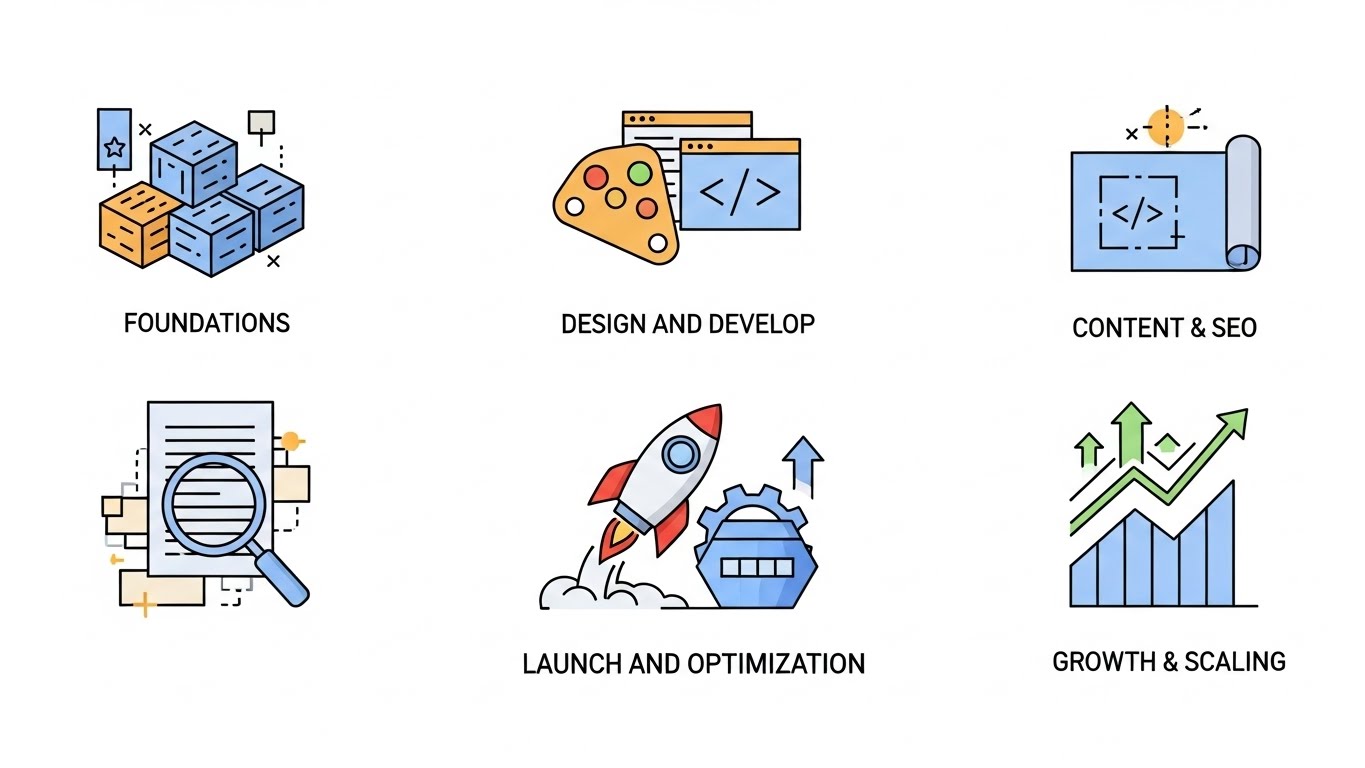
Here’s the exact roadmap we use for clients:
Phase 1: Foundation (Weeks 1-2)
Discovery & Audit:
- Comprehensive website audit (technical, SEO, UX)
- Competitor analysis (who’s ranking, what they’re doing)
- Keyword research (primary, secondary, long-tail)
- Target audience identification
- Analytics review (if existing site)
Deliverables:
- 50+ page audit report
- Keyword targeting strategy
- Wireframe/sitemap for new site
- Content outline for key pages
Phase 2: Design & Development (Weeks 3-6)
Design:
- Homepage mockup (2-3 options)
- Interior page templates
- Mobile design specifications
- Brand integration (colors, fonts, imagery)
Development:
- Custom WordPress or Shopify build
- Mobile-responsive implementation
- Page speed optimization
- Security implementation (SSL, firewalls)
- CMS training for client team
Deliverables:
- Fully functional website on staging server
- Mobile and desktop versions
- CMS with easy editing capabilities
Phase 3: Content & SEO (Weeks 5-8)
Content Creation:
- Service page copy (2,000+ words each)
- Homepage conversion-focused copy
- About page that builds trust
- Initial blog posts (5-10)
- Meta titles and descriptions
Technical SEO:
- XML sitemap creation
- Robots.txt optimization
- Schema markup implementation
- 301 redirects from old site
- Google Search Console setup
- Google Analytics 4 configuration
Deliverables:
- All pages with optimized content
- Technical SEO foundation complete
- Analytics tracking active
Phase 4: Launch & Optimization (Weeks 9-12)
Pre-Launch:
- Final testing (all devices, all browsers)
- Speed optimization (target: under 2 seconds)
- Form testing
- SSL verification
- Backup systems in place
Launch:
- DNS migration
- Post-launch monitoring (24/7 for first week)
- Immediate issue resolution
Post-Launch Optimization:
- Monitor rankings and traffic
- A/B testing CTAs
- Heatmap analysis
- Conversion rate optimization
- Quick-win improvements
Phase 5: Growth & Scaling (Ongoing)
Monthly Activities:
- 4-8 new blog posts targeting keywords
- Backlink building (guest posts, PR, partnerships)
- Technical SEO monitoring
- Content updates on existing pages
- Local SEO management (reviews, citations)
- Analytics reporting with recommendations
Quarterly Activities:
- Comprehensive SEO audit
- Competitor analysis update
- Content strategy refresh
- Conversion rate optimization review
- New landing page creation
Annual Activities:
- Complete site audit
- Design refresh (keep modern)
- Content pruning (remove low-performers)
- Technical infrastructure review
- Strategic planning for next year
Part 8: Pricing Reality Check (What Quality Actually Costs)
Let’s be transparent about pricing:
Budget Website ($1,500 – $3,000)
What You Get:
- Template-based design with minor customization
- 5-8 pages
- Basic SEO setup
- Mobile-responsive
- Contact forms
What You DON’T Get:
- Custom design
- Comprehensive SEO strategy
- Original content writing
- Ongoing optimization
- Strategic consulting
Good For:
- Solopreneurs just starting out
- Businesses that need “something” quickly
- Companies with internal marketing teams
Not Good For:
- Businesses relying on website for leads
- Competitive industries
- Scaling businesses
Professional Website ($5,000 – $15,000)
What You Get:
- Semi-custom design (customized template)
- 10-20 pages
- Professional copywriting
- Comprehensive SEO implementation
- Mobile optimization
- Analytics setup
- 3-6 months basic support
What You DON’T Get:
- Fully custom code (uses templates)
- Advanced functionality (complex databases, custom tools)
- Extensive content creation (blogs)
- Ongoing SEO management
Good For:
- Established small businesses
- Professional services (law, accounting, consulting)
- Local service businesses
- E-commerce (basic)
This Is Our Most Popular Tier
Enterprise Website ($15,000 – $50,000+)
What You Get:
- Fully custom design and development
- 20+ pages
- Advanced functionality (member areas, calculators, custom tools)
- Comprehensive content strategy (30+ pages)
- Technical SEO mastery
- Conversion optimization
- 12 months optimization and support
- Training for internal team
- Integrations (CRM, marketing automation, etc.)
Good For:
- Scaling businesses ($1M+ revenue)
- E-commerce (complex)
- SaaS companies
- Businesses with high lifetime customer value
- National or international brands
The Hidden Cost of Cheap Websites
Here’s what happens with a $500 Fiverr website:
- Year 1: Save $4,500 vs. professional site
- Year 1: Lose 1,000 potential customers (poor UX, no SEO)
- Year 1: Cost of lost customers at $100 avg value = $100,000 in lost revenue
The math is brutal: You “saved” $4,500 but lost $100,000.
A professional website isn’t an expense, it’s an investment that pays for itself 10-50x over.
Part 9: DIY vs. Professional (The Honest Comparison)
Can You Build It Yourself?
DIY Website Builders (Wix, Squarespace, etc.)
Pros:
- Low upfront cost ($20-40/month)
- Easy drag-and-drop interface
- Templates available
- No coding knowledge required
Cons:
- Limited customization (stuck with template constraints)
- SEO limitations (can’t optimize everything)
- Page speed issues (template bloat)
- No strategic guidance
- Time investment: 40-80 hours to build
- Ongoing management: 5-10 hours/month
Hidden Costs:
- Your time (40 hours × $100/hour = $4,000)
- Missed revenue while you’re building (not selling)
- Lower conversion rates vs. professional site
- Ranking behind competitors with better sites
Best For:
- Extreme budget constraints (under $1,000 total)
- Very simple sites (portfolio, single service)
- Tech-savvy owners with time
Professional Development
Pros:
- Custom solution for your specific needs
- Strategic approach (not just design)
- Optimized for conversions
- Proper SEO foundation
- Ongoing support and optimization
- Your time freed for revenue activities
Cons:
- Higher upfront investment
- Requires clear communication with developer
- Changes may take longer (developer schedule)
Best For:
- Serious businesses that need results
- Businesses with average customer value over $500
- Companies where website drives revenue
- Owners who value their time
Part 10: The Aurora Nexus Web Development + SEO Difference
Why Partner With Aurora Nexus?
1. We’re Results-Focused, Not Award-Focused
We don’t care about winning “Best Design Awards.” We care about:
- How many leads your site generates
- What percentage of visitors convert
- How much revenue your website drives
Our success metrics are your success metrics.
2. Strategy First, Design Second
Most agencies start with “What do you want your website to look like?”
We start with:
- Who are your customers?
- What problems do they have?
- How do they search for solutions?
- What makes them choose you vs. competitors?
- What keywords should we target?
Design follows strategy, not the other way around.
3. Built for SEO from Day One
Most developers build the site, then try to “add SEO” later. That’s backwards.
We build every site with SEO in the foundation:
- URL structure optimized for keywords
- Content architecture that builds authority
- Technical SEO baked into code
- Schema markup from launch
- Mobile-first, fast-loading foundation
4. Conversion Optimization Obsession
Every element has a purpose:
- Headlines tested for clarity
- CTAs optimized for clicks
- Forms simplified for completion
- Social proof strategically placed
- Page flow designed for buyer journey
We use heatmaps, A/B testing, and data to continually improve conversion rates.
5. You Own Everything
No hidden fees. No proprietary systems. No holding your site hostage.
You own:
- Your domain
- Your hosting
- Your content
- Your design files
- Complete admin access
We believe in full transparency and client ownership.
6. Transparent Pricing
Our Web Development + SEO Packages:
Starter Website Package – $3,500
- 5-8 page website
- Template-based design (customized)
- Basic SEO setup
- Mobile-responsive
- Contact forms
- 1 month support
- Best for: Solopreneurs, simple service businesses
Professional Website Package – $8,500
- 10-15 page website
- Semi-custom design
- Comprehensive SEO implementation
- Professional copywriting
- Advanced contact forms
- Analytics setup
- 3 months optimization & support
- Best for: Established small businesses
Premium Website Package – $15,000
- 15-20 page website
- Fully custom design
- Enterprise SEO strategy
- Complete content creation
- Conversion optimization
- Integrations (CRM, marketing automation)
- 6 months optimization & support
- Monthly blog content (4 posts)
- Best for: Scaling businesses
E-commerce Package – Starting at $12,000
- Custom Shopify or WooCommerce build
- Product page optimization
- Payment gateway integration
- Inventory management
- Email marketing integration
- Abandoned cart recovery
- 6 months support
Ongoing SEO Management – $1,500-3,500/month
- Monthly content creation (4-8 blog posts)
- Technical SEO monitoring
- Backlink building
- Keyword ranking tracking
- Analytics reporting
- Conversion optimization
- Competitor monitoring
Our Process (What Working Together Looks Like)
Week 1: Discovery & Strategy
- Kick-off call (understand your business, goals, audience)
- Competitor analysis
- Keyword research
- Sitemap and wireframe creation
- Content outline
Week 2-3: Design
- Homepage mockup presentation
- Revisions (up to 3 rounds)
- Interior page templates
- Mobile version design
Week 4-6: Development
- Website build on staging server
- Content population
- SEO implementation
- Testing (all devices, all browsers)
Week 7: Review & Launch
- Client review on staging site
- Final revisions
- Pre-launch checklist completion
- Launch!
- Post-launch monitoring
Ongoing: Optimization
- Monthly analytics review
- Content additions
- SEO improvements
- Conversion rate testing
- Technical maintenance
Part 11: Take Action (Your Next Steps)
The difference between businesses thriving online and businesses struggling isn’t luck, it’s having the right digital foundation.
Here’s what to do next:
Step 1: Audit Your Current Site (10 minutes)
Use our checklist above to score your website. Be honest about what’s working and what isn’t.
Step 2: Calculate Your Opportunity Cost (5 minutes)
How many potential customers are you losing each month due to:
- Not ranking on Google?
- Slow loading speed?
- Poor mobile experience?
- Confusing navigation?
- Unprofessional design?
If you’re losing even 10 customers per month at $500 average value, that’s $60,000 annually.
Step 3: Book Your Free Website Strategy Session (30 minutes)
We’ll review your current site (or situation if you don’t have one) and:
- Identify critical issues costing you money
- Show you exactly what needs to be fixed
- Provide a prioritized action plan
- Give you a custom quote for your specific needs
No obligation. No sales pressure. Just honest analysis and recommendations.
Conclusion: Your Website Is Your 24/7 Salesperson
Think about it: Your website works 24/7/365. It never takes a day off. It never gets sick. It’s the first impression for most of your potential customers.
If you had a salesperson who:
- Showed up looking unprofessional
- Couldn’t answer basic questions
- Made customers wait 10 seconds to talk
- Confused everyone they spoke with
…you’d fire them immediately.
But that’s what a bad website does, every single day.
On the flip side, a high-performing website:
- Generates leads while you sleep
- Answers questions automatically
- Builds trust instantly
- Converts visitors into customers
- Compounds its value over time
The best time to fix your website was last year.
The second-best time is today.
Every day you wait is another day of lost revenue, lost customers, and lost opportunities.
Ready to Transform Your Online Presence?
Book your free website strategy session today.
We’ll analyze your current situation and show you exactly what’s possible with proper web development and SEO.
📧 Contact: contact@auroranexus.io
🌐 Website: www.auroranexus.io
Frequently Asked Questions
Q: How long does it take to build a website?
A: Professional websites take 4-8 weeks from kickoff to launch, depending on complexity. Simple sites can be done in 2-3 weeks, while e-commerce or custom functionality may take 10-12 weeks.
Q: Do I need to provide content, or do you write it?
A: We offer both options. We can write all content for you (recommended for SEO), or you can provide content and we’ll optimize it. Most clients choose our content creation service to ensure proper SEO implementation.
Q: What if I already have a website?
A: We can audit your existing site and either optimize it or recommend a rebuild if necessary. Sometimes optimization is enough; sometimes a fresh start is more cost-effective.
Q: Can you guarantee #1 rankings on Google?
A: No ethical SEO agency can guarantee specific rankings (Google’s algorithms change constantly). However, we guarantee to follow best practices that have consistently produced top-10 rankings for our clients across 100+ industries.
Q: How long until I see SEO results?
A: Typically 3-6 months for meaningful improvement. SEO is a long-term investment, not a quick fix. However, some clients see rankings within 4-6 weeks for less competitive keywords.
Q: Do you offer payment plans?
A: Yes. We offer milestone-based payment (e.g., 50% to start, 50% at launch) and can discuss extended payment terms for larger projects.
Q: What platforms do you build on?
A: We primarily use WordPress (for business sites) and Shopify (for e-commerce), but can work with other platforms based on your needs. We recommend these because they’re powerful, flexible, and you maintain full control.
Q: Will I be able to update the site myself?
A: Yes! We build all sites on user-friendly CMS platforms and provide training. You’ll be able to add blog posts, update content, and make basic changes. For major updates, we’re here to help.
Q: What’s included in ongoing SEO management?
A: Monthly content creation (blog posts), technical SEO monitoring, backlink building, keyword tracking, analytics reporting, and strategic recommendations. Think of it as having an in-house SEO team for a fraction of the cost.
Q: Do you work with businesses outside Pakistan?
A: Absolutely! While we’re based in Pakistan, we serve clients globally (US, Canada, UK, Australia, Middle East, etc.). All communication is in English, and we work across time zones.
Q: What industries do you work with?
A: We work across all industries: professional services (law, accounting, consulting), healthcare, e-commerce, real estate, manufacturing, tech/SaaS, financial services, and more. Our process adapts to any industry.

One Response