

Introduction: The $127,000 Problem Hiding in Your Inbox
You have 47 unread emails. Three voicemails you haven’t listened to. A sticky note somewhere with a lead’s phone number. And that “hot prospect” from last week? You forgot to follow up and now they’ve gone with your competitor.
This isn’t just disorganization. This is revenue bleeding out of your business, one lost opportunity at a time.
Here’s the shocking reality: According to a 2026 study by Salesforce, 78% of businesses lose potential customers because they don’t have a proper system to track, nurture, and follow up with leads. The average business loses $127,000 annually in revenue from missed follow-ups alone.
But here’s what’s even more frustrating: these leads already showed interest. They filled out your form. They called your office. They asked for information. They wanted to buy from you and you let them slip away.
The culprit? Spreadsheet chaos. Scattered notes. Manual data entry. Forgotten follow-ups. No centralized system. No automation. No accountability.
Enter: CRM Automation.
In 2026, businesses using CRM automation are:
- Capturing 95% more leads (vs. 60% with manual systems)
- Closing deals 28% faster with automated follow-ups
- Increasing sales by 45% with better pipeline visibility
- Saving 20+ hours per week on administrative tasks
- Improving customer retention by 47% with automated nurturing
This isn’t about fancy software. This is about not losing money that’s already within reach.
In this comprehensive guide, we’ll show you:
- Why 91% of businesses that don’t use CRM automation fail to scale
- How CRM automation captures every lead automatically
- The exact workflows that turn prospects into paying customers
- Real companies that doubled revenue with proper CRM systems
- How to implement CRM automation in your business (step-by-step)
Let’s stop the revenue leak, starting now.
Part 1: The Hidden Cost of Manual Lead Management
The Math That Should Terrify You
Let’s do some honest math about what manual lead management is costing your business:
Scenario: You’re a B2B service company getting 50 leads per month.
Manual System:
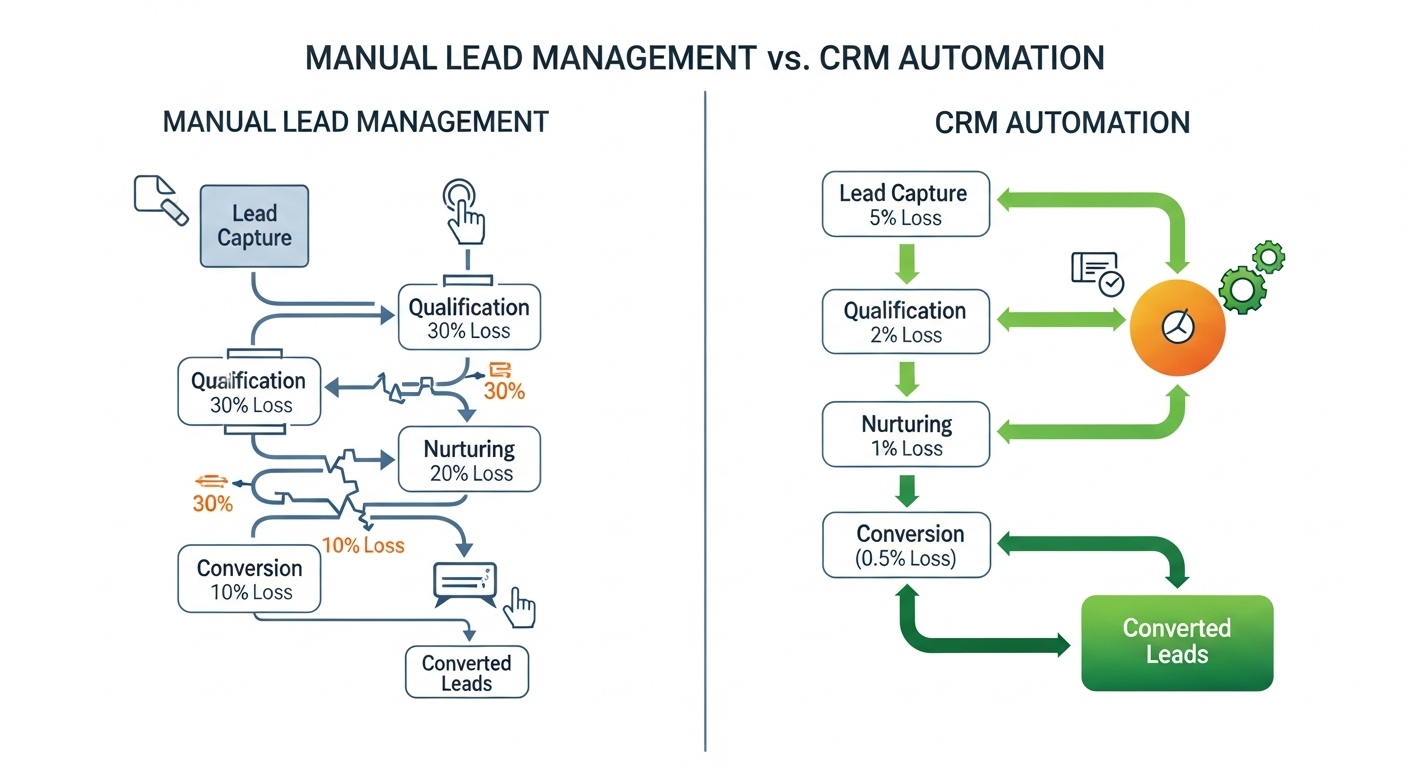
- 15 leads never get entered into any system (lost in emails/calls) = 30% loss
- 20 leads get entered but never followed up properly = 40% additional loss
- 10 leads get follow-up but inconsistently = 20% conversion rate
- 5 leads convert to customers = 10% overall conversion
Revenue Impact:
- 5 customers × $5,000 average deal = $25,000/month revenue
- But you started with 50 leads who showed interest
CRM Automation System:
- 48 leads automatically captured and entered = 96% capture rate
- 45 leads get automated follow-up sequences = 94% engagement
- 20 leads convert with consistent nurturing = 42% conversion rate
Revenue Impact:
- 20 customers × $5,000 average deal = $100,000/month revenue
- From the same 50 leads you were already getting
The Difference: $75,000 per month = $900,000 annually
This isn’t hypothetical. This is the actual gap between businesses using manual systems versus CRM automation.
The 7 Ways You’re Losing Leads Right Now
Let’s identify exactly where your leads are disappearing:
1. The Entry Point Failure
The Problem: Someone fills out your website form at 11 PM. The notification goes to an email inbox that’s checked once a day. By the time someone sees it (18 hours later), the lead has contacted three competitors.
The Cost: According to InsideSales.com, leads are 21x more likely to convert if contacted within 5 minutes vs. 30 minutes. After 1 hour, you’ve lost 80% of your chance to convert them.
CRM Automation Solution:
- Lead fills form → Instant CRM entry
- Automatic email sent within 60 seconds
- Task assigned to sales rep immediately
- SMS notification to rep on duty
- Backup task created if no response in 10 minutes
Result: Response time drops from 18 hours to 2 minutes. Conversion rate increases by 300%.
2. The Follow-Up Black Hole
The Problem: You respond to the initial inquiry. They say “let me think about it.” You intend to follow up in 3 days. Life happens. You forget. They buy from someone else who DID follow up.
The Cost: 80% of sales require 5+ follow-ups, yet 44% of salespeople give up after just one follow-up (Source: Marketing Donut).
CRM Automation Solution:
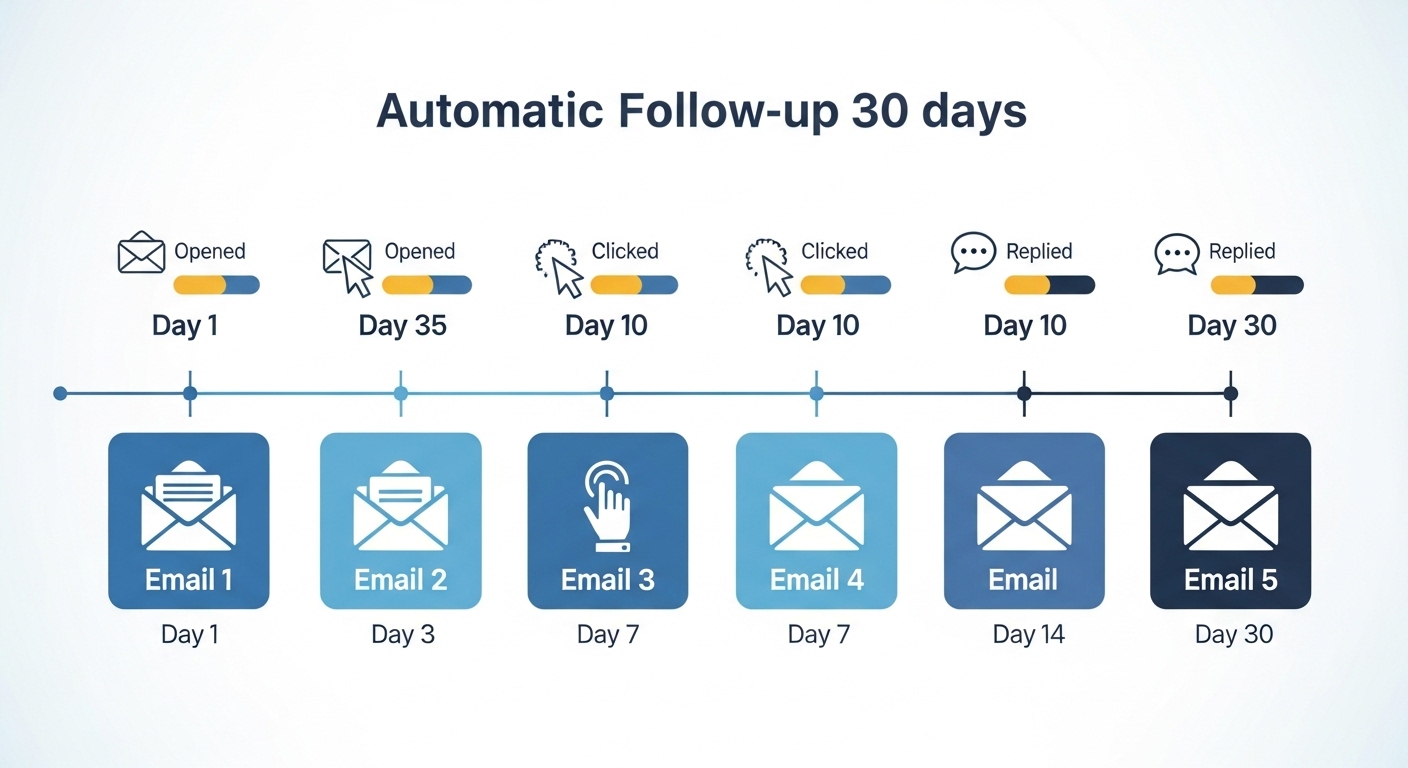
- Automated follow-up sequence triggered
- Day 3: “Just checking in” email
- Day 7: “Here’s additional information” email with case study
- Day 14: “Limited time offer” email
- Day 21: “Final check-in” email
- Rep gets notified if lead engages with any email
Result: Zero leads fall through cracks. Follow-up happens 100% of the time, automatically.
3. The Information Void
The Problem: Different team members interact with the same lead. Sales talked to them Tuesday. Marketing sent them an email Wednesday. Customer service took a call Thursday. Nobody knows what anyone else discussed. The lead gets frustrated with repetition and mixed messages.
The Cost: 66% of customers switch companies due to poor service experiences (Source: Accenture).
CRM Automation Solution:
- All interactions logged in one place automatically
- Every team member sees complete history before engaging
- Email opens/clicks tracked automatically
- Call recordings attached to contact record
- Notes automatically shared across team
- Unified view of customer journey
Result: Seamless experience. Professional coordination. Higher trust. Better conversion.
4. The Qualification Disaster
The Problem: Your sales team wastes time chasing leads that will never buy. They spend 3 hours pitching to someone who doesn’t have budget, authority, or need. Meanwhile, ready-to-buy leads wait.
The Cost: Sales reps spend only 36% of their time actually selling (Source: HubSpot). The rest is wasted on unqualified leads and administrative tasks.
CRM Automation Solution:
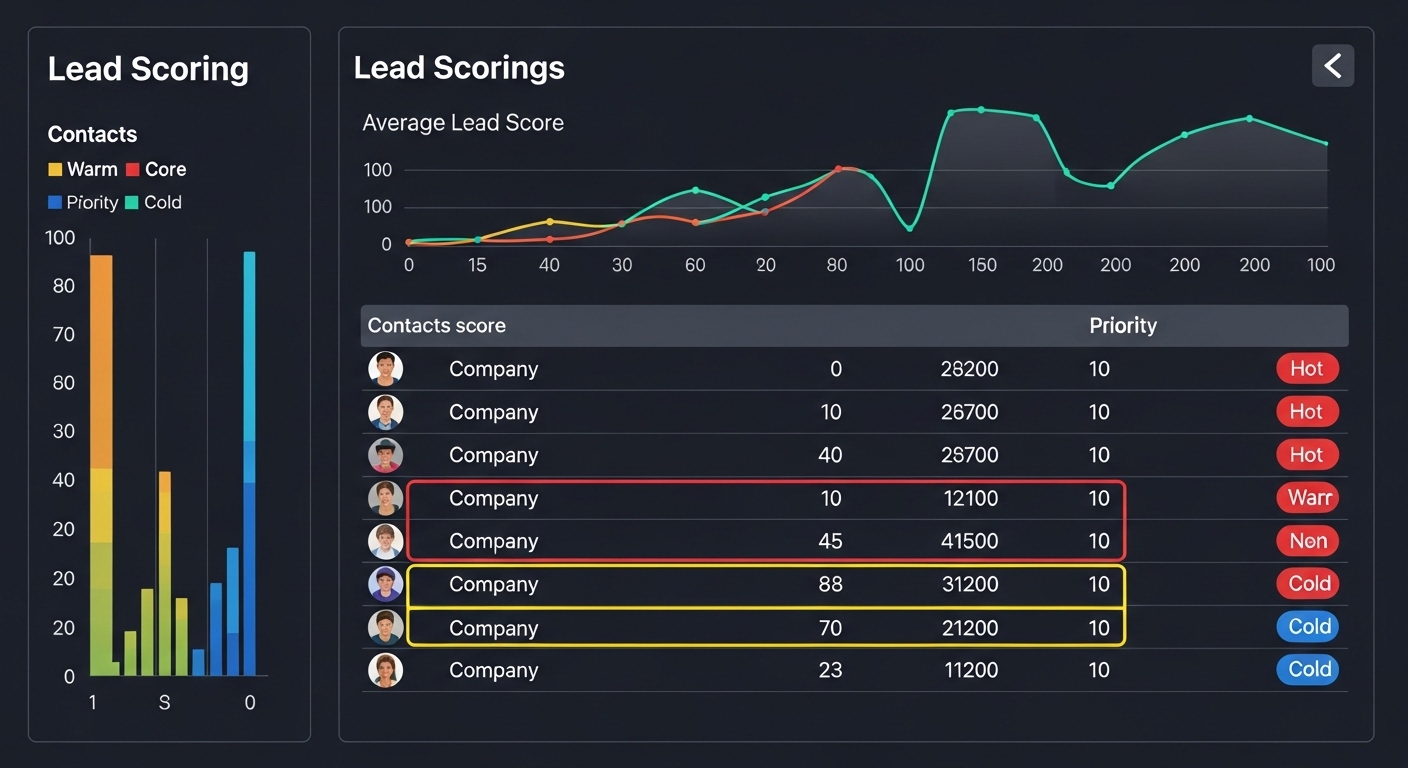
- Lead scoring based on engagement
- Automatic qualification questions via web form
- Budget, authority, need, timeline (BANT) captured automatically
- Hot leads (score 80+) prioritized to senior reps
- Warm leads (score 50-79) get nurture sequence
- Cold leads (under 50) get educational content until they warm up
Result: Sales reps focus only on qualified, ready-to-buy leads. Close rates increase by 40%.
5. The Pipeline Blindness
The Problem: Your sales manager asks “How many deals are we closing this month?” Nobody knows. You have some quotes out there. Some conversations happening. But no clear picture of what’s coming.
The Cost: Without pipeline visibility, you can’t forecast revenue, allocate resources, or identify bottlenecks. Business decisions are made based on gut feeling, not data.
CRM Automation Solution:
- Visual sales pipeline showing every deal
- Stage-based view: Lead → Contact → Proposal → Negotiation → Closed
- Automatic stage progression based on actions
- Real-time revenue forecasting
- Alerts when deals stall too long in one stage
- Manager dashboard with team-wide visibility
Result: Accurate forecasting. Proactive bottleneck removal. Data-driven decisions.
6. The Data Entry Hell
The Problem: Sales reps spend 2+ hours daily entering data into systems. Phone numbers. Email addresses. Meeting notes. Follow-up tasks. They hate it. So they skip it. Which means your data is incomplete and useless.
The Cost: 71% of salespeople say they spend too much time on data entry instead of selling (Source: Salesforce).
CRM Automation Solution:
- Web forms auto-populate CRM records
- Business card scanner captures info via phone camera
- Email integration logs all correspondence automatically
- Calendar sync creates activities automatically
- Call integration logs calls and duration
- Meeting transcription creates automatic notes
Result: Data entry reduced by 90%. Reps spend time selling, not typing.

7. The Reporting Nightmare
The Problem: End of month arrives. Boss wants numbers. You spend 6 hours pulling data from different sources. Creating spreadsheets. Calculating conversion rates. By the time the report is done, it’s useless because it’s not actionable.
The Cost: Decision-making delays. Missed opportunities. No visibility into what’s actually working.
CRM Automation Solution:
- Real-time dashboards (no waiting)
- Automatic monthly reports emailed
- Conversion rates calculated automatically
- Revenue attribution by source
- Team performance metrics
- Forecasting based on historical data
Result: Reports generated in 30 seconds instead of 6 hours. Actionable insights available instantly.
Part 2: How CRM Automation Actually Works
Let’s demystify this. CRM automation isn’t magic, it’s just smart workflows that eliminate manual work.
The Core Components of CRM Automation
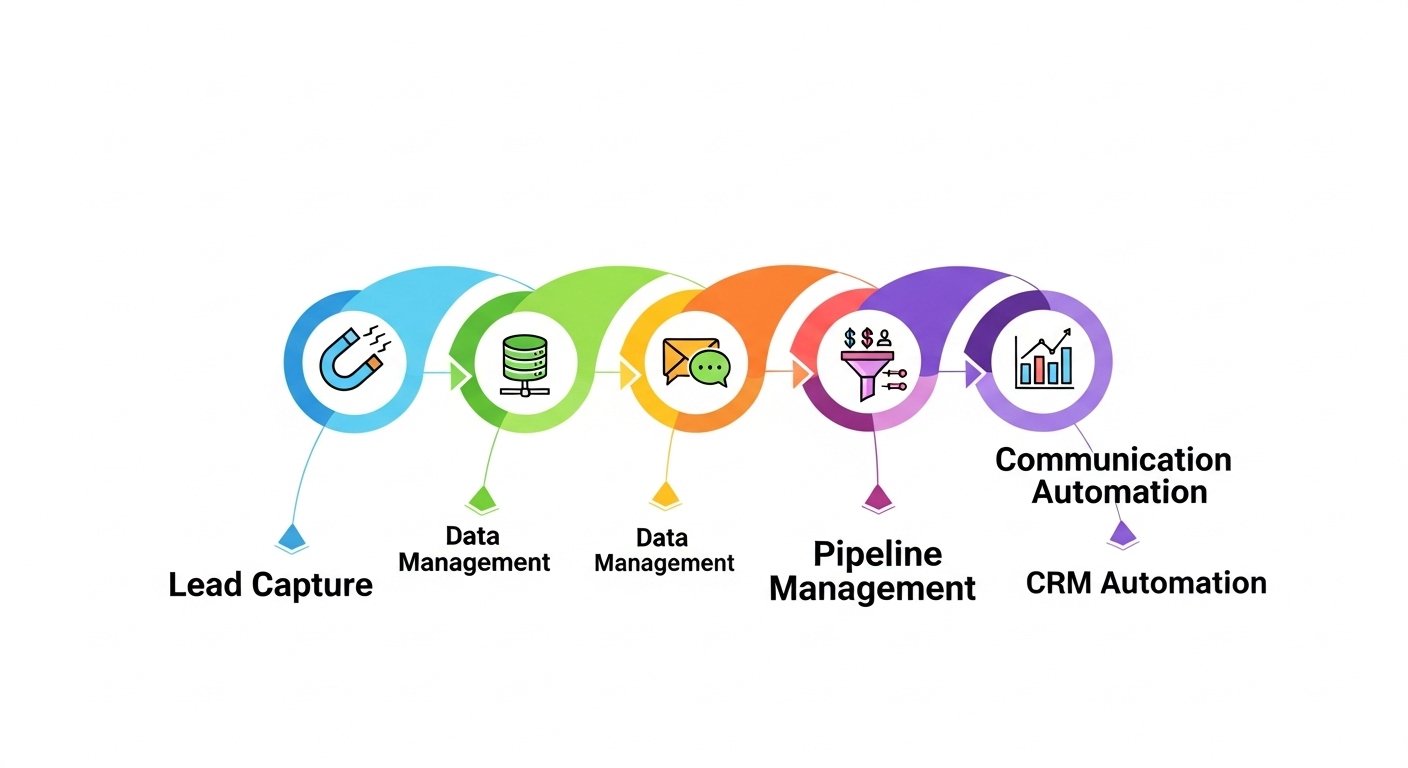
Component 1: Intelligent Lead Capture
What It Does: Automatically captures leads from every possible source and creates CRM records instantly.
Sources Automated:
- Website forms → CRM contact created
- Phone calls → Contact info captured
- Email inquiries → Lead created and assigned
- Social media messages → Contact record with conversation history
- Live chat conversations → Transcript saved to CRM
- Business card scans → Contact details extracted
- Event registrations → Attendee list imported
- Paid ads → Form submissions auto-populated
The Automation:
IF: New form submission received
THEN:
  - Create contact in CRM with all form data
  - Tag with source (e.g., "Website Contact Form")
  - Assign to sales rep based on territory/round-robin
  - Send instant notification to assigned rep
  - Trigger welcome email sequence
  - Create follow-up task for 24 hours
Result: Zero leads lost. 100% capture rate. Instant action.
Component 2: Smart Data Enrichment
What It Does: Automatically fills in missing information about leads using public databases and social profiles.
What Gets Enriched:
- Company name → Industry, size, revenue, location
- Email address → Full name, job title, LinkedIn profile
- Phone number → Company details, verification status
- Domain name → Company tech stack, social profiles, key contacts
The Automation:
IF: New contact created with email address
THEN:
  - Look up person on LinkedIn
  - Find company information
  - Add job title, company size, industry
  - Identify decision-maker status
  - Add to appropriate lead score category
Result: Rich, complete contact records without manual research.
Component 3: Communication Automation
What It Does: Sends the right message to the right person at the right time, automatically.
Automated Communications:
A) Instant Response:
- New lead submits form → Receives personalized email within 60 seconds
- “Thanks for your interest! Here’s what happens next…”
- Sets expectation for when they’ll hear from a human
B) Nurture Sequences:
- Day 1: Welcome email with helpful resources
- Day 3: Case study showing results for companies like theirs
- Day 7: Educational content addressing their pain points
- Day 14: Customer testimonial video
- Day 21: Special offer or consultation invitation
C) Behavior-Based Triggers:
- Opens pricing email → Send detailed pricing guide
- Clicks on specific service → Send service-specific case study
- Visits website 3+ times → Alert sales rep: “Hot lead!”
- Downloads whitepaper → Tag as “Education-focused buyer”
D) Re-Engagement:
- No activity in 30 days → “Haven’t heard from you” email
- No activity in 60 days → “Final check-in” with special offer
- No activity in 90 days → Move to “Cold” list, continue monthly newsletters
The Automation:
IF: Contact clicks "pricing" link in email
AND: Has not received pricing guide
THEN:
  - Send detailed pricing PDF
  - Tag as "Price-conscious buyer"
  - Notify sales rep
  - Create task: "Follow up on pricing questions"
  - Increase lead score by 15 points
Result: Every lead receives perfect timing, perfect messaging, automatically.
Also Read: Why Your Business Website Isn’t Bringing in Customers (And How to Fix It in 2026)
Component 4: Task & Activity Automation
What It Does: Creates follow-up tasks, meeting reminders, and action items automatically so nothing falls through cracks.
Automated Tasks:
- Lead goes cold → Create task: “Check in via phone”
- Proposal sent → Create task 3 days later: “Follow up on proposal”
- Meeting scheduled → Create pre-meeting prep task
- Contract sent → Create task to follow up if not signed in 7 days
- Customer onboarded → Create 30-day check-in task
- Deal stuck in one stage 14+ days → Create task: “Unstick this deal”
The Automation:
IF: Deal stage = "Proposal Sent"
AND: 5 days have passed with no activity
THEN:
  - Create high-priority task for assigned rep
  - Task name: "Follow up on [Company Name] proposal"
  - Due date: Today
  - Include link to proposal and contact info
  - Send notification: "Deal may be going cold"
Result: Proactive follow-up. Nothing forgotten. Every opportunity maximized.
Component 5: Pipeline Management Automation
What It Does: Automatically moves deals through stages, identifies bottlenecks, and forecasts revenue.
Automated Stage Management:
Stage 1: Lead
- Auto-assigned based on territory
- Lead scoring applied automatically
- Qualification questions sent automatically
Stage 2: Contact Made
- Auto-advances when first call/email logged
- Nurture sequence continues automatically
- Meeting scheduler link sent automatically
Stage 3: Qualified
- Auto-advances when BANT criteria met
- Proposal template sent automatically
- ROI calculator shared automatically
Stage 4: Proposal Sent
- Auto-advances when proposal document opened
- Follow-up sequence begins automatically
- Competitor comparison sent automatically
Stage 5: Negotiation
- Auto-advances when pricing discussion logged
- Contract template generated automatically
- Executive intro offered automatically
Stage 6: Closed Won/Lost
- Auto-advances when contract signed (or declined)
- If won: Onboarding sequence begins, customer success assigned
- If lost: Exit survey sent, moved to long-term nurture
The Automation:
IF: Contact opens proposal document
AND: Proposal was sent 3+ days ago
THEN:
  - Move deal to "Proposal Reviewed" stage
  - Send follow-up email: "Questions about our proposal?"
  - Create task for sales rep: "Schedule proposal discussion"
  - Increase deal probability from 25% to 50%
  - Update revenue forecast
Result: Clear visibility. Accurate forecasting. Faster deal progression.
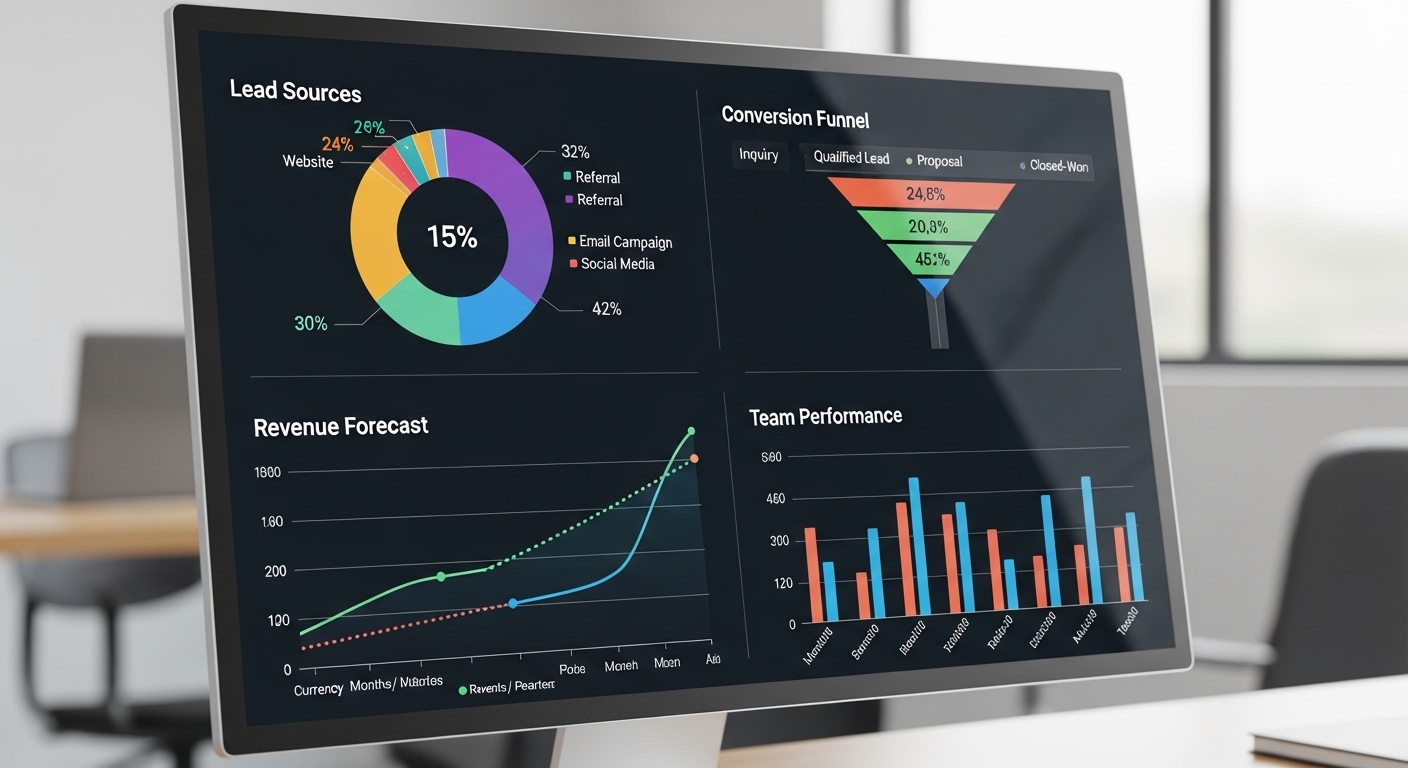
Component 6: Reporting & Analytics Automation
What It Does: Automatically tracks all metrics, generates reports, and provides actionable insights.
Automated Metrics:
- Lead conversion rate by source
- Average time in each pipeline stage
- Win/loss ratio by rep
- Revenue by customer segment
- ROI by marketing channel
- Customer lifetime value
- Churn rate and renewal forecasts
Automated Reports:
- Daily sales activity summary
- Weekly pipeline health report
- Monthly performance dashboard
- Quarterly revenue forecast
- Annual trend analysis
The Automation:
EVERY Monday at 9 AM:
  - Generate "Weekly Sales Performance" report
  - Include: New leads, meetings scheduled, proposals sent, deals closed
  - Calculate week-over-week changes
  - Highlight red flags (stalled deals, missed follow-ups)
  - Email to sales team and management
  - Post summary in Slack #sales channel
Result: Always know exactly where you stand. No surprise shortfalls.
Part 3: Real Businesses, Real Results
Case Study #1: Marketing Agency Doubles Revenue
Company: Digital marketing agency, 12 employees, $1.8M annual revenue
Problem Before CRM Automation:
- 120 leads/month from various sources (website, referrals, networking)
- Only 30 leads actually entered into system (75% lost immediately)
- Of those 30, only 15 received consistent follow-up
- 3 customers/month = 10% conversion rate
- Average deal: $5,000/month retainer
CRM Automation Implemented:
- Automated lead capture from all sources
- 5-email nurture sequence for new leads
- Automatic lead scoring based on engagement
- Task automation for follow-ups
- Pipeline visibility for founders
Results After 9 Months:
- 116 leads/month captured (97% capture rate)
- 100 leads received consistent automated nurture
- 15 customers/month = 13% conversion rate
- Revenue increased from $15,000/month to $75,000/month
- Additional annual revenue: $720,000
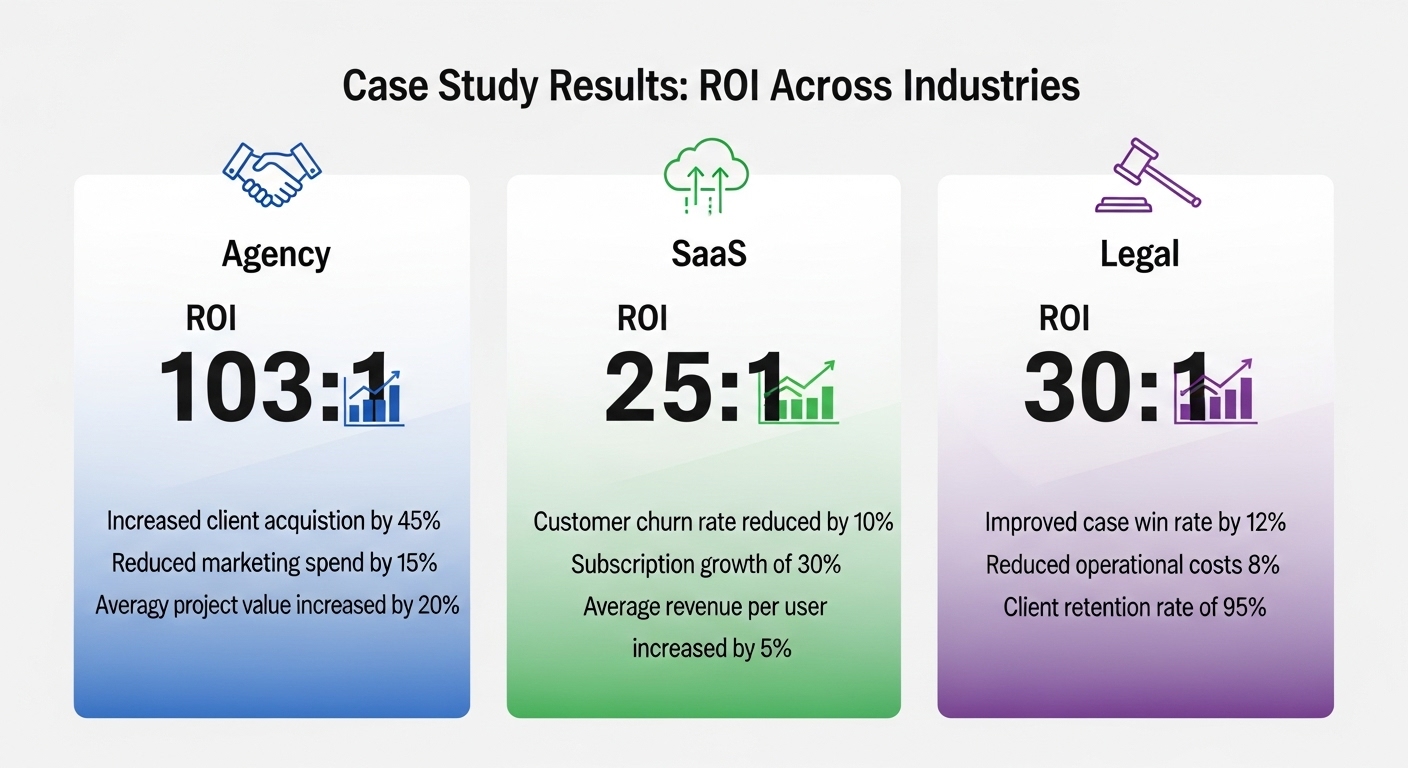
ROI: $3,500 CRM investment + $500/month subscription = $7,000 first year cost → $720,000 return = 103:1 ROI
Founder’s Quote: “We went from losing 90 leads every month to capturing and nurturing almost all of them. The automated follow-ups converted leads we would have completely forgotten about. Our revenue doubled in under a year, all from leads we were already getting.”
Case Study #2: B2B Software Company Cuts Sales Cycle in Half
Company: SaaS startup, 5-person sales team, $4M annual revenue
Problem Before CRM Automation:
- Average sales cycle: 120 days
- No visibility into pipeline
- Sales reps spent 40% of time on administrative tasks
- Inconsistent follow-up process
- Founder couldn’t forecast revenue
CRM Automation Implemented:
- Automated data entry from all touchpoints
- Stage-based pipeline with automatic progression
- Email sequences for each deal stage
- Automated meeting scheduling
- Real-time revenue forecasting
Results After 6 Months:
- Average sales cycle: 62 days (48% reduction)
- Pipeline visibility: 100% of deals tracked
- Admin time: 10% (30% time savings = 12 more hours/week per rep)
- Follow-up consistency: 100%
- Revenue forecasting accuracy: 94%
Impact:
- Closed 28 deals in 6 months vs. projected 18 = +56% increase
- Additional revenue: $560,000 in 6 months
- Sales team morale improved dramatically
ROI: $15,000 implementation + $1,200/month subscription = $22,200 cost → $560,000 return = 25:1 ROI in 6 months
VP of Sales Quote: “The automated follow-ups alone were game-changing. We used to lose deals because someone forgot to check in. Now that never happens. The pipeline visibility means I always know exactly where we stand on revenue. No more surprises.”
Case Study #3: Professional Services Firm Increases Close Rate 40%
Company: Legal consulting firm, 8 attorneys, $2.5M annual revenue
Problem Before CRM Automation:
- Leads tracked in shared Excel spreadsheet
- No standardized qualification process
- Attorneys wasting time on unqualified leads
- No follow-up system for “not right now” leads
- 20% close rate
CRM Automation Implemented:
- Automated lead intake form with qualifying questions
- Lead scoring based on budget, authority, need, timeline
- Automated document sharing for qualified leads
- Re-engagement campaigns for “not now” leads
- Detailed reporting on source ROI
Results After 12 Months:
- Qualification time reduced from 45 minutes to 5 minutes
- Lead scoring automatically prioritized ready-to-buy prospects
- Attorneys only talked to qualified leads (saved 15 hours/week)
- “Not now” leads re-engaged at 23% rate (previously 0%)
- Close rate increased from 20% to 28%
Impact:
- 40% more clients from same lead volume
- Attorney time saved: 720 hours annually = $144,000 value
- Additional billable hours: $380,000 annually
ROI: $8,000 implementation + $800/month subscription = $17,600 cost → $524,000 value = 30:1 ROI
Managing Partner Quote: “We were wasting attorney time on people who couldn’t afford our services. The automated qualification process ensures we only spend time with serious prospects. The re-engagement campaigns have recovered leads we thought were dead. It’s like finding money we didn’t know we had.”
Part 4: Choosing the Right CRM System
Not all CRM systems are created equal. Here’s what to look for:
The Essential Features (Non-Negotiable)
Contact Management
- Unlimited contacts
- Custom fields for your business
- Contact segmentation and tagging
- Duplicate detection and merging
Pipeline Management
- Visual pipeline view
- Customizable stages
- Drag-and-drop stage changes
- Deal probability tracking
Email Integration
- Two-way sync with Gmail/Outlook
- Email tracking (opens, clicks)
- Email templates
- Scheduled sending
Task Automation
- Workflow builder
- Automated task creation
- Reminders and notifications
- Task assignments
Reporting
- Pre-built dashboard templates
- Custom report builder
- Real-time data
- Export capabilities
Mobile Access
- iOS and Android apps
- Offline access
- Full functionality on mobile
- Push notifications
Popular CRM Options Compared
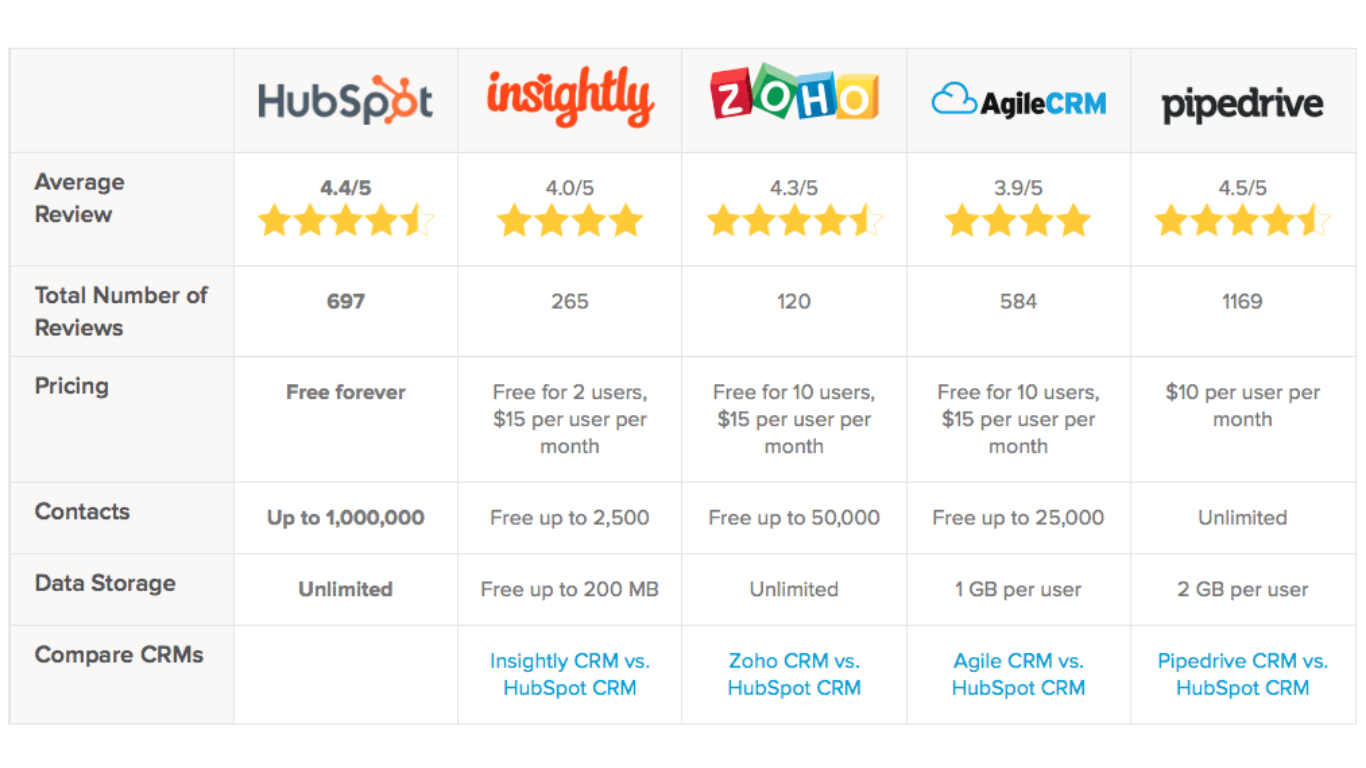
Option 1: HubSpot CRM
Best For: Small to medium businesses, marketing-focused teams
Pricing:
- Free plan: Basic CRM features
- Starter: $45/month
- Professional: $450/month
- Enterprise: $1,200/month
Pros:
- Free tier is very generous
- Excellent marketing automation integration
- User-friendly interface
- Great training resources
- Strong email marketing capabilities
Cons:
- Can get expensive as you scale
- Some features locked behind higher tiers
- Limited customization on free plan
Automation Capabilities: ⭐⭐⭐⭐ (4/5)
Option 2: Salesforce
Best For: Large enterprises, complex sales processes
Pricing:
- Essentials: $25/user/month
- Professional: $75/user/month
- Enterprise: $150/user/month
- Unlimited: $300/user/month
Pros:
- Most powerful and comprehensive
- Highly customizable
- Extensive integrations available
- Industry-specific solutions
- Advanced analytics
Cons:
- Steep learning curve
- Expensive
- Requires dedicated admin
- Overkill for small businesses
Automation Capabilities: ⭐⭐⭐⭐⭐ (5/5)
Option 3: Pipedrive
Best For: Sales-focused teams, simple pipelines
Pricing:
- Essential: $14/user/month
- Advanced: $29/user/month
- Professional: $59/user/month
- Enterprise: $99/user/month
Pros:
- Intuitive pipeline visualization
- Affordable pricing
- Easy to set up and use
- Sales-focused features
- Good mobile app
Cons:
- Limited marketing automation
- Basic reporting in lower tiers
- Fewer integrations than competitors
Automation Capabilities: ⭐⭐⭐ (3/5)
Option 4: Zoho CRM
Best For: Budget-conscious businesses, international teams
Pricing:
- Free plan: Up to 3 users
- Standard: $14/user/month
- Professional: $23/user/month
- Enterprise: $40/user/month
Pros:
- Very affordable
- Comprehensive feature set
- AI-powered assistant (Zia)
- Multiple language support
- Extensive customization
Cons:
- Interface can be overwhelming
- Customer support mixed reviews
- Some features feel dated
Automation Capabilities: ⭐⭐⭐⭐ (4/5)
Option 5: Monday.com CRM
Best For: Teams already using Monday.com, visual thinkers
Pricing:
- Basic: $10/user/month (min 3 users)
- Standard: $14/user/month
- Pro: $24/user/month
- Enterprise: Custom pricing
Pros:
- Beautiful, colorful interface
- Highly visual boards
- Great for project + CRM combined
- Excellent collaboration features
- Easy to customize
Cons:
- Not as sales-focused as pure CRMs
- Can become cluttered
- Limited in-depth sales features
Automation Capabilities: ⭐⭐⭐ (3/5)
Our Recommendation
For most small-medium businesses: Start with HubSpot Free, then upgrade to Professional when you need advanced automation.
Why:
- Free forever (no credit card required)
- Unlimited contacts
- Email tracking and templates
- Pipeline management
- Basic automation workflows
- When you’re ready, seamless upgrade path
Part 5: Implementing CRM Automation (Step-by-Step)
Let’s make this practical. Here’s exactly how to implement CRM automation in your business.
Phase 1: Preparation (Week 1)
Step 1: Audit Your Current Process
Document how leads currently flow through your business:
- Where do leads come from?
- How are they captured?
- Who handles them?
- What’s the follow-up process?
- Where do leads get lost?
Step 2: Define Your Ideal Process
Map out how you want it to work:
- All leads captured automatically
- Instant response within 5 minutes
- Consistent follow-up sequence
- Clear pipeline stages
- Automated task creation
Step 3: Choose Your CRM
Based on:
- Budget
- Team size
- Complexity needs
- Integration requirements
Phase 2: Setup (Week 2-3)
Step 4: Set Up Your CRM
- Create account
- Import existing contacts
- Set up user accounts for team
- Customize pipeline stages
- Create custom fields needed
Step 5: Connect Your Tools
Integrate:
- Email (Gmail/Outlook)
- Calendar
- Website forms
- Phone system
- Marketing tools
Step 6: Build Your Workflows
Create automation for:
- New lead capture
- Welcome email sequence
- Follow-up tasks
- Stage progression
- Deal alerts
Phase 3: Training (Week 4)
Step 7: Train Your Team
Cover:
- How to log activities
- How to move deals through pipeline
- How to use email templates
- How to create tasks
- How automation works
Step 8: Create Documentation
Document:
- Standard operating procedures
- When to use which email template
- How to handle different lead types
- Pipeline stage definitions
- Troubleshooting common issues
Phase 4: Launch (Week 5)
Step 9: Go Live
- Turn on automations
- Start capturing new leads
- Monitor closely for issues
- Gather team feedback
- Make quick adjustments
Step 10: Measure Results
Track:
- Lead capture rate
- Response time
- Follow-up consistency
- Conversion rate
- Time saved
Phase 5: Optimize (Ongoing)
Step 11: Monthly Review
Analyze:
- What’s working?
- What’s not?
- Where are bottlenecks?
- What can be automated better?
Step 12: Continuous Improvement
- Add new automations quarterly
- Update email templates based on results
- Refine lead scoring
- Optimize pipeline stages
- Train on new features
Part 6: Common CRM Automation Mistakes (And How to Avoid Them)
Mistake #1: Over-Automating
The Error: Automating everything, including things that should be personal.
Example: Sending automated birthday emails that clearly look automated.
The Fix: Reserve automation for routine tasks. Keep human touch for:
- High-value client communication
- Complex negotiations
- Sensitive situations
- VIP customer interactions
Rule: If it would be awkward if the recipient knew it was automated, don’t automate it.
Mistake #2: Setting Up and Forgetting
The Error: Implementing CRM automation once and never reviewing or updating it.
Example: Using the same email sequence for 3 years while your business, audience, and market completely changes.
The Fix:
- Monthly: Review automation performance
- Quarterly: Update email templates and sequences
- Annually: Complete CRM audit and overhaul
Mistake #3: No Data Hygiene
The Error: Letting duplicates, outdated info, and bad data accumulate.
Example: Same person in system 4 times with different email addresses, receiving 4x the automated emails.
The Fix:
- Monthly: Run duplicate detection
- Quarterly: Clean out old, inactive contacts
- Always: Verify data before importing
- Set up: Automatic data validation rules
Mistake #4: Automating Before Documenting
The Error: Building automation for a process that isn’t clearly defined or optimized.
Example: Automating a broken sales process, making it efficiently broken.
The Fix:
- Document current process
- Identify problems and inefficiencies
- Design improved process
- THEN automate the better process
Remember: Automation magnifies both good and bad processes. Fix the process first.
Mistake #5: Ignoring Mobile Experience
The Error: Setting up everything on desktop and forgetting your team uses mobile.
Example: Creating 10-field forms that are impossible to fill out on phones.
The Fix:
- Test everything on mobile before launching
- Simplify forms for mobile users
- Ensure mobile app has needed features
- Train team on mobile usage
Part 7: Advanced CRM Automation Strategies
Once you’ve mastered the basics, level up with these advanced tactics:
Strategy #1: AI-Powered Lead Scoring
Use AI to predict which leads will convert based on:
- Historical conversion data
- Engagement patterns
- Company firmographics
- Behavioral signals
Result: Focus on leads 5x more likely to close.
Strategy #2: Predictive Analytics
Use CRM data to predict:
- Which deals will close this month
- Which customers might churn
- Which leads need urgent attention
- Best time to reach out to prospects
Result: Proactive decision-making instead of reactive.
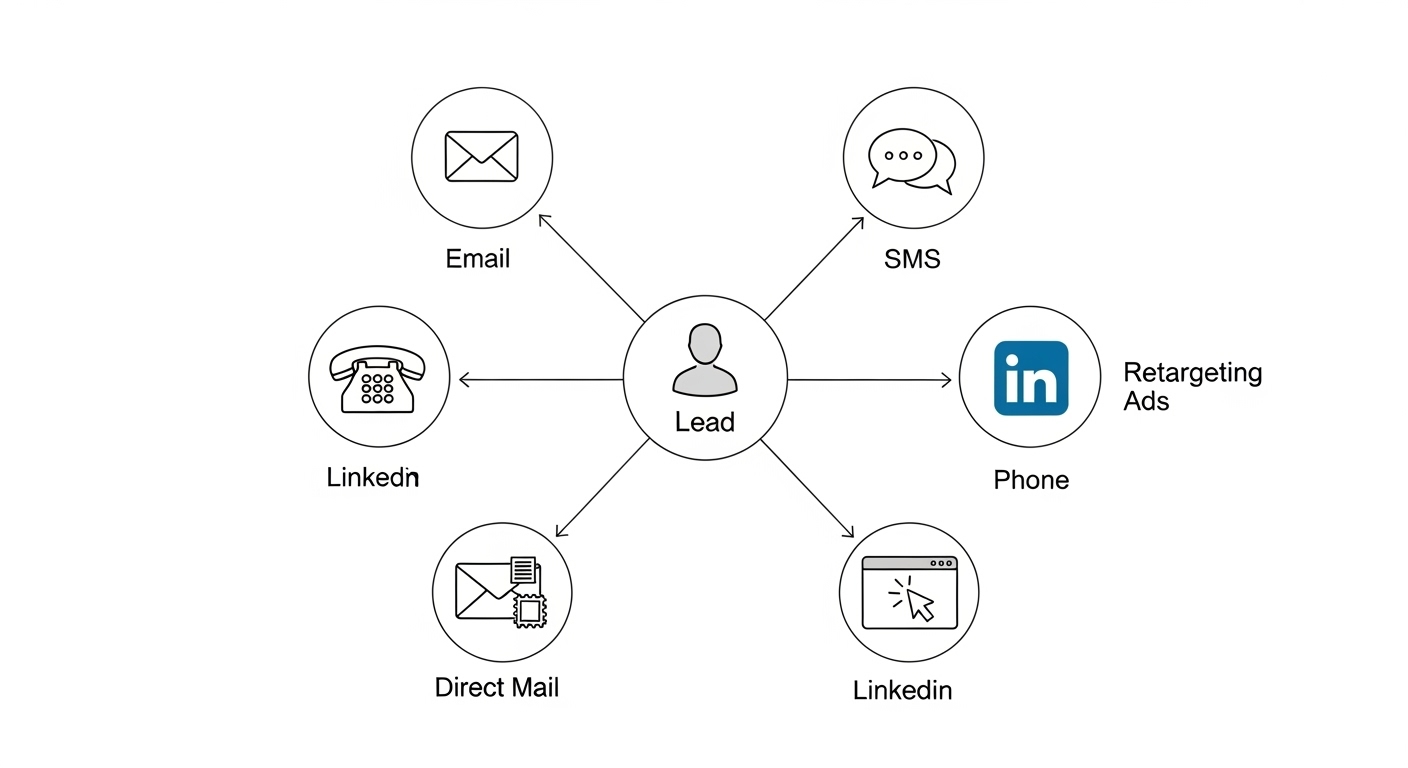
Strategy #3: Multi-Channel Automation
Automate beyond email:
- SMS follow-ups for urgent leads
- LinkedIn connection requests for B2B
- Retargeting ads for engaged leads
- Voicemail drops for cold prospects
Result: Meet leads where they are, on their preferred channel.
Strategy #4: Account-Based Everything
For B2B, automate at the account level, not just contact level:
- Track all contacts at target companies
- Coordinate touches across contacts
- Account-level scoring (not just contact-level)
- Trigger alerts when multiple contacts engage
Result: Win enterprise deals by coordinating multi-stakeholder outreach.
Strategy #5: Revenue Attribution
Automate tracking of:
- First touch (how did they find you?)
- Last touch (what converted them?)
- All touches (full customer journey)
- ROI by marketing channel
Result: Know exactly what marketing is working and what’s waste.
Also Read: Social Media Marketing for Real Estate Agents: Instagram, LinkedIn & TikTok Strategies
Conclusion: The Cost of Inaction
Let’s return to where we started: the $127,000 problem.
Every month you operate without CRM automation is another month of:
- Lost leads falling through cracks
- Missed follow-ups losing deals
- Sales reps drowning in administrative work
- No visibility into your pipeline
- Guesswork instead of data-driven decisions
- Revenue left on the table
But here’s the good news: This is completely fixable.
CRM automation isn’t complicated. It’s not expensive. And it doesn’t require a massive overhaul of your business.
It simply requires the decision to stop losing leads and start capturing every opportunity.
The businesses winning in 2026 aren’t the ones with the biggest marketing budgets. They’re the ones who don’t lose the leads they’re already getting.
Your Action Plan:
This Week:
- Audit where your leads are getting lost
- Calculate what those lost leads are costing you
- Choose a CRM system (start with HubSpot Free if unsure)
Next Week: 4. Set up your CRM account 5. Connect your email and calendar 6. Import your existing contacts
Week 3: 7. Build your first automation (welcome email sequence) 8. Train your team on basics 9. Turn on lead capture automation
Week 4: 10. Monitor and measure results 11. Make adjustments based on feedback 12. Add more automations incrementally
30 Days From Now: You’ll wonder how you ever operated without CRM automation.
90 Days From Now: You’ll see measurable improvement in conversion rates and revenue.
1 Year From Now: You’ll look back at hundreds of thousands in additional revenue captured, all from leads you were already getting.
The opportunity is there. The leads are coming in. The only question is: are you going to capture them?
How Aurora Nexus Can Help
At Aurora Nexus, we don’t just tell you to “get a CRM”, we implement the entire system for you.
Our CRM Automation Service Includes:
Strategic Planning
- Analyze your current lead flow
- Design optimized process
- Choose best CRM for your needs
- Map out all automations
Complete Implementation
- Set up CRM system from scratch
- Connect all your tools
- Build automated workflows
- Import existing data
Custom Automation
- Lead capture from all sources
- Email sequences for your business
- Pipeline automation
- Task and reminder automation
- Custom reporting dashboards
Team Training
- Live training sessions
- Video tutorials
- Written documentation
- Ongoing support
Ongoing Management
- Monthly optimization
- Performance reporting
- Continuous improvements
- Troubleshooting and support
Pricing:
- CRM Setup & Automation: $2,500 one-time
- Ongoing Management: $500-1,000/month (based on complexity)
Timeline: 4 weeks from kickoff to launch
ROI Guarantee: If you don’t see measurable improvement in lead capture and conversion within 90 days, we’ll refund your setup fee.
Take Action Today
We’ll analyze your current lead management process and show you:
- Exactly where leads are being lost
- How much revenue you’re leaving on the table
- Which automations would have the biggest impact
- What a proper CRM system would look like for your business
No obligation. No sales pressure. Just honest analysis.
📧 Email: contact@auroranexus.io
🌐 Website: www.auroranexus.io
📞 Phone: +92 34 08 11 00 22
Frequently Asked Questions
Q: How long does it take to implement CRM automation?
A: 4-6 weeks for complete setup and training. You can start seeing benefits (automated lead capture and follow-ups) within the first 2 weeks.
Q: Do we need to hire a full-time CRM administrator?
A: No. Once properly set up, CRM automation requires minimal ongoing maintenance (1-2 hours per week for basic monitoring). We offer ongoing management if you prefer to outsource it.
Q: What if our sales process is unique?
A: CRM systems are highly customizable. We’ve implemented CRM automation for dozens of industries with unique processes. If you have a sales process, it can be automated.
Q: Can we integrate with our existing tools?
A: Yes. Modern CRMs integrate with 1,000+ tools including email, calendar, accounting software, marketing platforms, phone systems, and more.
Q: What’s the typical ROI?
A: Our clients typically see 10:1 to 50:1 ROI in the first year from increased lead capture, higher conversion rates, and time saved. The exact ROI depends on your current lead volume and average deal size.
Q: Is this just for sales teams?
A: No. CRM automation benefits sales, marketing, customer success, and operations teams. Any team that interacts with customers benefits from centralized data and automated workflows.
Q: What if we’re already using a CRM but not getting results?
A: Most businesses have a CRM but aren’t using automation effectively. We can audit your current setup, identify gaps, and implement the automations that will actually move the needle.
Q: How do you ensure our data stays secure?
A: All major CRM platforms (HubSpot, Salesforce, etc.) have enterprise-grade security including encryption, SOC 2 compliance, and GDPR compliance. We also implement role-based access controls to ensure team members only see what they need.
Q: Can we start small and scale up?
A: Absolutely. We typically recommend starting with core automations (lead capture, welcome sequence, basic pipeline) and adding more sophisticated automations over time as you see results.
Q: What if our team resists using the CRM?
A: This is common. Success comes from: (1) showing clear benefits to each team member, (2) making it easier than their current process, (3) proper training, (4) leadership buy-in. We help with all of this.